Docs
How to direct OLAS emissions to different staking contracts.
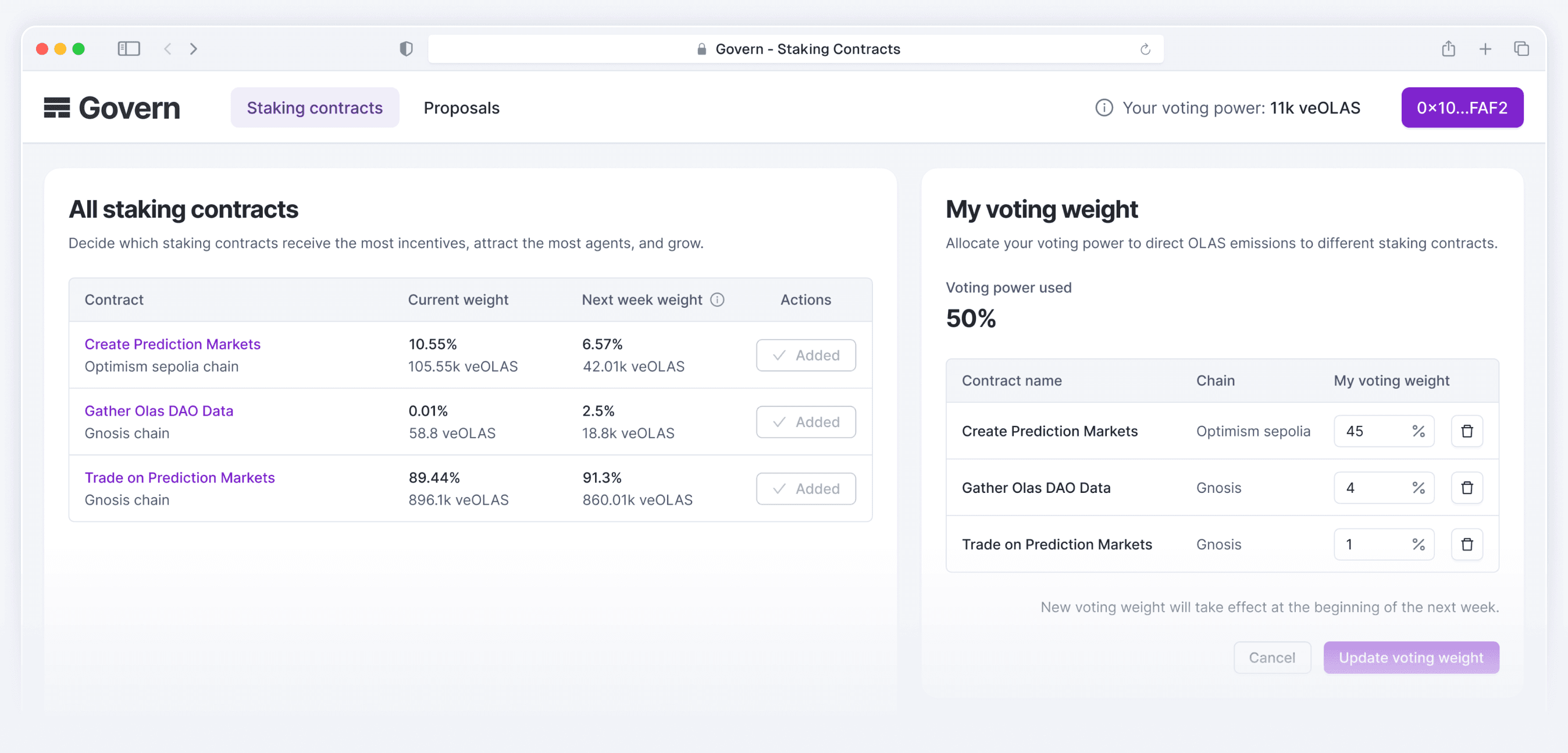
What is Olas Govern?
Olas Govern is a dApp for participating in Olas DAO governance. It enables members to use veOLAS to shape the Olas ecosystem by:
- Voting on on-chain proposals to guide key decisions for the DAO.
- Locking OLAS into veOLAS to gain voting power for governance decisions, including proposals and social actions like tweet approvals.
- Starting new tokenomic epochs that kick off a fresh emission cycle for OLAS, with epoch switched here https://govern.olas.network/epoch and emissions data tracked here https://olas.network/olas-token.
- Directing OLAS emissions to specific staking contracts through veOLAS voting, supporting the growth of agent economies via targeted incentives.
- Boosting rewards of devs by making a donation to a service here:https://govern.olas.network/donate.
Govern is the main hub for all governance activity, from shaping incentives to influencing the broader direction of the Olas ecosystem.
Core Concepts
- OLAS Emissions: Direct OLAS emissions to staking contracts.
- veOLAS Voting: Allocate voting weights using veOLAS.
- Staking Contracts: Smart contracts eligible to receive OLAS emissions.
- Voting Weights: Members allocate their total veOLAS balance across multiple staking contracts. For each voting epoch, 100% of a member's veOLAS is used, and members decide how to split it. For example, 1% to Contract A, 5% to Contract B, 94% to Contract C. Voting weights are expressed as percentages of the total veOLAS balance.
- Epoch Voting: Votes for staking contracts are locked for 10 days and applied on the upcoming Thursday.
- Dev Rewards: Developer rewards are distributed through a protocol-native mechanism using NFTs to represent code contributions (agents and components). When these NFTs are referenced in deployed services that receive ETH donations, developers earn a proportional share of those ETH rewards.
- OLAS Boost: If a service receives ETH donations and its owner or donator holds enough veOLAS, the service can be whitelisted, allowing additional OLAS token top-ups to be minted and distributed to the contributing NFTs (agents and components). Note: OLAS Boost is currently disabled following the most recent governance vote.
- DAO Control: The DAO governs both the share of ETH donations allocated to reward code and the protocol share (currently set to zero) and the portion of OLAS inflation used for reward top-ups (currently set to zero).The DAO governs three key parameters:
- the share of ETH donations allocated to reward code,
- the share of ETH donations allocated, currently set to zero, and, the portion of OLAS inflation used for reward top-ups, currently set to zero.
Step-by-Step Guide: How to Direct OLAS Emissions
- Browse available staking contracts in the Govern app.
- Allocate your voting weights using veOLAS (up to 100% of your voting power).
- Submit your vote.
- Wait for the new tokenomics Epoch to start.
- Initiate claim for staking incentives. OLAS emissions are distributed based on accumulated weights.
Troubleshooting / FAQs
- Can I vote multiple times per epoch? Yes, you can vote for multiple nominees, but you cannot repeatedly vote within 10 days. To adjust your prior vote, wait until 10 days have passed since your last vote.
- Why do I have zero voting power? You need active veOLAS to vote. You can lock OLAS for veOLAS here: https://govern.olas.network/veolas
- Can I use part of my voting power to vote? No. If a vote is submitted on only some contracts, the remaining percentage of voting power will be automatically allocated to the Rollover Pool.
- How are OLAS emissions distributed? Based on the total voting weight assigned to each staking contract. Here is an example:
- We have Staking Contract A and Staking Contract B
- Voter 1 and 2 both with x veOLAS distributed as follows:
- Voter 1 using 90% for Contract A, 10% retained
- Voter 2 using 50% for Contract B, 50% retained
- Then, the total aggregation of votes is as follows
- Contract A Votes: 90x/2x = 45
- Contract B Votes: 50x/2x = 25
- Retained Amount: 60x/2x = 30
Contributing / Feedback
Found outdated information or a typo? Submit issues or suggestions on GitHub.
Learn More
- Direct the future of Olas: https://olas.network/govern